

Default Browser
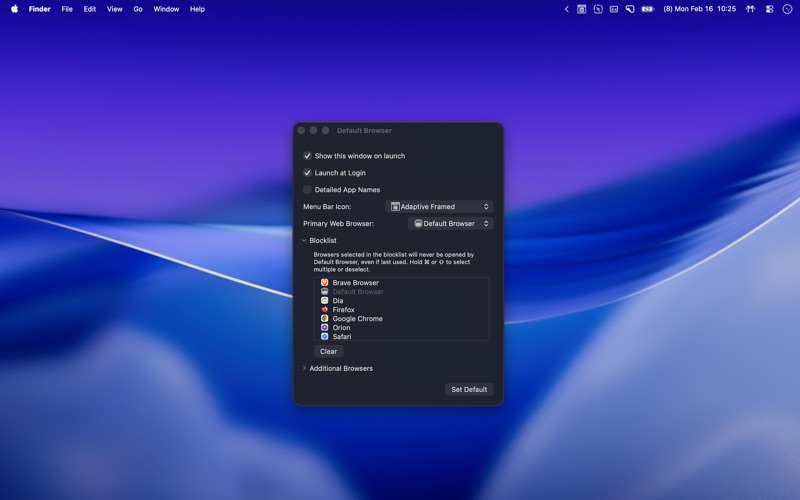

Read our expert review of Default Browser for Mac. Discover how this menu bar utility simplifies link routing and browser management on macOS.
For power users who constantly juggle multiple web browsers, managing link routing can be a daily frustration. Default Browser link management utility solves this exact problem by introducing an elegant, automated way to control which application opens your web links based on your active usage or specific rules.
What is the Default Browser Link Management Utility?
Developed by Cameron Little, this lightweight utility sits quietly in your macOS menu bar, giving you instant command over your system's internet navigation. Instead of being locked into a single static browser, this tool dynamically routes links to the web browser you used most recently or allows you to manually swap your default browser with a single click. It is designed specifically for macOS users who need to separate their work, personal, and development browsing environments without constantly digging into system settings.
Key Features and Workflow Integration
- Smart Dynamic Routing: Automatically opens clicked links using the last browser you actively used, maintaining your current workflow context.
- Elegant Menu Bar Control: Swap your default system browser instantly from a streamlined, unobtrusive dropdown menu.
- Custom Browser Rules: Specify exactly which browsers should handle your web traffic based on your preferences.
- Lightweight Footprint: Designed natively for the Mac platform, ensuring minimal resource usage and seamless system integration.
Who Is This Mac Utility For?
This software is highly recommended for developers who need to test websites across Safari, Chrome, and Firefox simultaneously. It is also an excellent fit for remote professionals who want to keep their professional SaaS applications running in one browser while keeping personal links confined to another. By utilizing the Default Browser link management utility, you eliminate the friction of copying and pasting URLs between different windows.
A Smarter Way to Browse
Rather than letting macOS dictate how you access the web, this tool puts the control back in your hands. If you are ready to streamline your multi-browser workflow, you can find more information and purchase the application directly on the Mac App Store.